
Mentorship slots
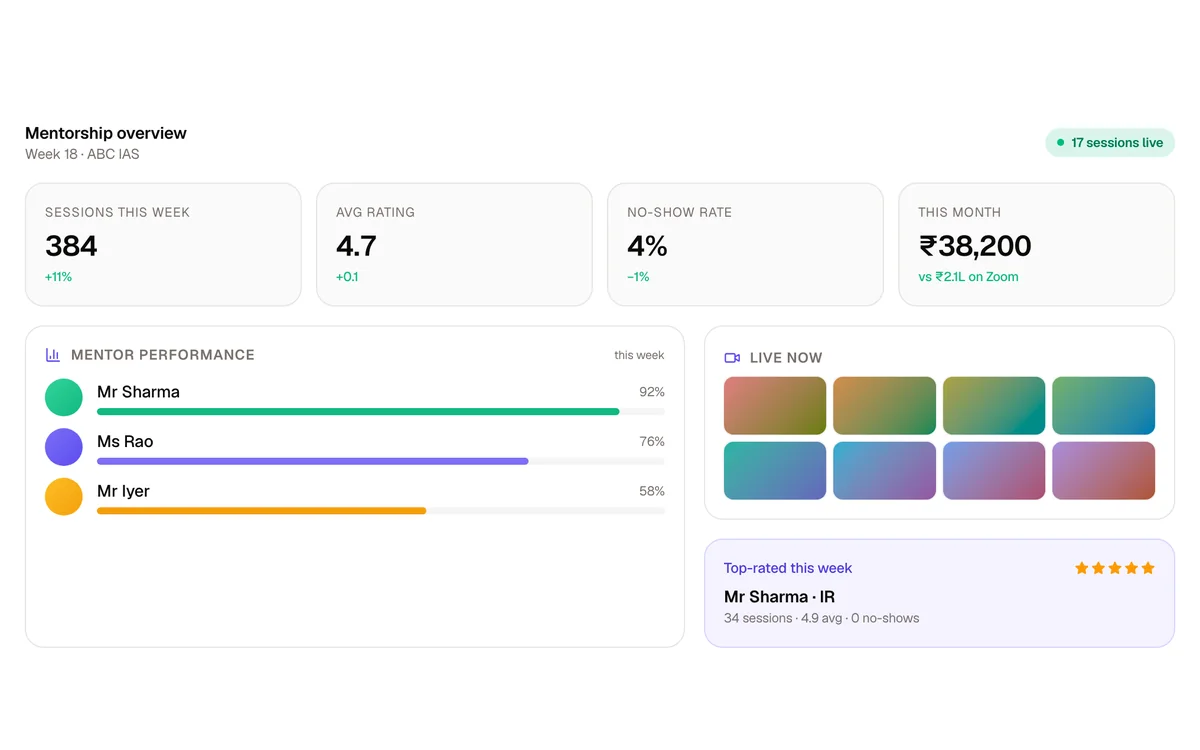
Students book slots with your Mains Mentors, online or at your centre, with booking limits, up to three reminders, attendance and feedback. A Mains series can let students book only the mentors who evaluated their copy.
Run Mains test series with evaluators, reviewers and a full audit trail, check daily answer writing by subject, and sell GS courses and bilingual Prelims tests in your own branded app, with VidSafe protecting every lecture and PDF.
One screen recording of a GS batch, forwarded on Telegram, can reach aspirants who never pay you. Put in your own numbers and see what that can add up to.
Students × course fee × share of seats lost. An illustration to try with your own numbers, not a measured statistic.
Every lecture you upload is protected by VidSafe's own proprietary multi-layer encryption.
The student's name and ID move across every video, backed by an invisible forensic watermark, and every PDF is watermarked with the student's details, so a leak traces back to one account.
Recording attempts are caught, even a phone camera pointed at the screen, then logged and reported to you.
Shared logins are stopped, so one purchase stays with one student.
VidSafe comes with our higher plans.
Our promise: fast responses, and a support team that helps with everything, from your first course to your busiest admission season.
Ask for help and hear back quickly, from people who know your account.
Courses, uploads, tests, apps, payments or a student who cannot log in: one team handles it all.
Our team sets up your academy with you and moves your courses, students and settings over from your current platform.
From the first enquiry to the last Mains test: every aspirant's activity, tests and mentor in one place.
Capture leads, follow up and enrol them, then give each student the right courses and batches.
A 0 to 100 engagement score over 7, 30, 90 and 180 days, from watch time, attempts, practice copies and logins, with streak, rank and percentile, so you see who is active and who is going quiet.
Search and edit student profiles, check a pasted list of numbers against your students, and help anyone who cannot log in.
Announcements, push notifications and emails targeted to a batch, plus support tickets and mentors for follow-up.
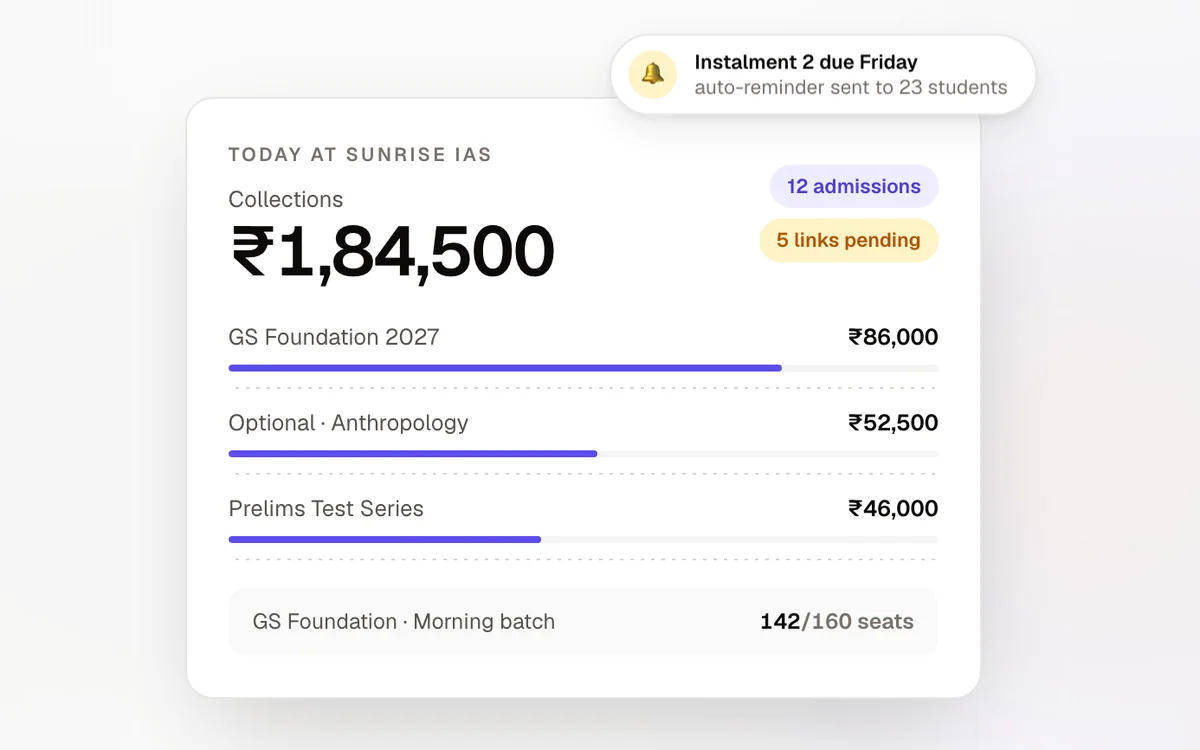
Classroom GS batches run on instalments. Admisso keeps every one of them on track. Every admission, every instalment, every rupee.
Collecting answer sheets, sharing them with evaluators and sending marked copies back by hand is slow and hard to track.
Students submit copies in the app or on the web, each copy goes to the least-loaded evaluator automatically, an optional reviewer checks it, and the student gets the marked copy back with question-wise marks.
Which copies are still unchecked, who is behind, and what happened to a copy a student is asking about?
The Mains Dashboard shows every copy by status and flags any stuck for more than two days, and Submission History records every step with who did it and when.
Keeping separate tests for each medium doubles the work for your team.
A Prelims test carries each question in English and Hindi, and students switch language mid-test. Mains copies are submitted in the language they were written in.
Every live class means downloading, renaming and uploading a recording.
Set a Zoom class to upload its recording by itself, published or held back. It arrives encrypted by VidSafe with the course's watermark.
Students submit in the app or on the web, in the language they wrote in. Copies go to your evaluators automatically, through an optional review, and back to the student with marks, a report and model answers.
One PDF, or photos of each page joined into one, before the Submission Last Date. One copy per student per test.
Turn on Assign Evaluators Automatically and each copy goes to the least-loaded evaluator, from the evaluators you select or all of them.
Evaluators download the copy, mark it, and upload the marked PDF with marks for every question and an overall comment.
Mains Reviewers accept and publish, accept without publishing, or send a copy back to the evaluator with a reason. They can upload a corrected copy and change marks.
Automatically after evaluation or review, on a date and time you set, or one by one. Students get a push notification.
Rank and percentile, topper and average marks, a marks histogram, an online and offline comparison and question-wise marks, plus model answers and video solutions.
Send a copy back to the student with a reason and a resubmission date, and they get a push notification.
Upload one student's copy, or a zip of scans named by student ID, up to 200 PDFs at a time, with a report for every file.
Students submit in the language they wrote in, and evaluators see it on every copy.
Your Mains Manager sees where each copy stands, who is behind and what happened to any copy, without chasing anyone on WhatsApp.
Test by test: online, offline, not assigned, under evaluation, evaluated, under review, reviewed and published, with a red Delayed badge on copies stuck for more than two days.
Each evaluator's copies in progress, done and graded, split by Grade A or B, full or half length, and online or offline, and each reviewer's reviewed and rejected copies.
Evaluators and reviewers work from personal queues, filtered by mode, language, dates, grade and status, including copies a reviewer sent back.
Filter a test by mode, language, status, evaluator or reviewer. Assign or change evaluators and reviewers, return a copy to the student, publish, delete or reset an evaluation.
Combined, online and offline ranks for every test.
A full audit trail of every copy: submitted, assigned, evaluated, reviewed, rejected, returned, reset and published, with who, when, the comment and the marks.
Answer writing doesn't wait for a test. Students upload an answer in any subject, whenever they write one, and it goes to an evaluator for that subject.
Students pick the subject, enter the number of questions and upload a PDF.
Map evaluators to subjects. With auto-assign on, each copy goes to the least-loaded evaluator for its subject.
For each course: total questions, questions a day, maximum pages and maximum file size.
The evaluator uploads the marked PDF with marks and a comment, or rejects it and gives the question back to the student. A manager publishes each copy.
A Mains Practice Dashboard by course and subject, and a dashboard for each evaluator.
Mains Practice Managers and Mains Practice Evaluators get their own access.
Bilingual, timed tests with negative marking, analysis students can act on, and offline OMR tests in the same reports.
Every question in two languages. Students switch language mid-test and mark questions for review.
MCQ, numerical and paragraph questions, per-question marks and negative marking, sections with their own timers, shuffling, multiple attempts, resume, and an optional penalty for unanswered questions.
Upload questions from .docx files, one per language, with English and Hindi samples to start from, or generate practice MCQs from your lecture videos with AI.
Score, accuracy and time on right, wrong and skipped questions, rank and percentile, the marks distribution, and a comparison with the topper and the average.
Each question's accuracy across all students, and the fastest and average times against the student's own.
Students tag each mistake with your institute's own error tags.
Upload a CSV of OMR results, and offline students get the same reports, with an offline-only ranking.
Release reports at once or on a date and time you set.
Reprocess every report in one click after an answer-key or marks change.
Teach on Zoom and let Upclass do the rest: the recording lands in the course, encrypted and watermarked, and attendance is marked for you.
Upload and publish the recording, upload it without publishing, or do nothing: you choose for every live class.
After class the recording is fetched by itself and encrypted by VidSafe with the course's watermark, then takes the live class's place in the course.
Zoom attendance marks students present at 80% of class time, with a graph of joins over time.
Mentorship, engagement, batch groups and more, around your courses and tests.
Students book slots with your Mains Mentors, online or at your centre, with booking limits, up to three reminders, attendance and feedback. A Mains series can let students book only the mentors who evaluated their copy.
A 0 to 100 engagement score over 7, 30, 90 and 180 days, from watch time, attempts, practice copies and logins, with streak, rank and percentile.
Course chat groups keep a batch talking between classes, and a built-in ticket system, with support-desk roles for your team, handles student queries.
Push notifications, emails and scheduled posts, targeted to the right batch.
Aspirants download lectures in your app and watch them without internet.
Turn a lecture into formatted study notes, or generate practice MCQs with answer explanations from your videos.
Aspirants study on the phone between classes and on a laptop at home. Your branded apps cover both, with the same protection everywhere. Published under your name on the App Store and Google Play, so students see only your brand.
iOS and Android apps with your branding
iOS AndroidOptimised for iPad and Android tablets
iPad AndroidNative apps for macOS and Windows
macOS WindowsYour own course website, in any modern browser
Chrome SafariUPSC preparation runs on mentorship. Mentora runs your whole mentorship programme: one-to-one sessions over built-in video, follow-ups and every aspirant's progress in one place.
Start with your own course website from ₹1,999/month and add VidSafe, your own domain and branded apps as you grow. Or pay ₹120 per student per month, or share revenue.
Your fees go straight into your own payment gateway. We bill you separately, and there's no revenue share unless you choose that plan.
Selling test series? Upclass Mock Test, our test series platform, is priced separately: a 20% revenue share, with a minimum bill of ₹20,000 a month.
What UPSC institutes ask us most. Anything else, ask our team.
Book a free demo. We will walk you through Mains evaluation, Mains Practice, Prelims tests and VidSafe, and recommend a plan.